What Should Be Included in an Amazon Publishing Package? A Checklist to Compare Providers
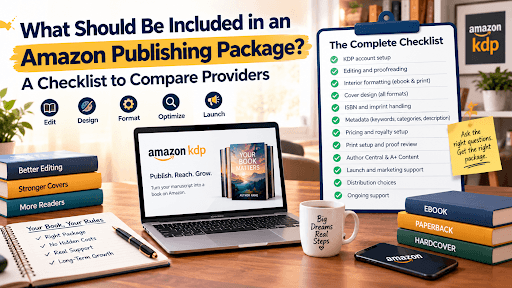
Choosing between Amazon publishing services feels simple until you put three quotes side by side. One promises full KDP setup for a low flat fee. Another bundles editing, a cover and ads. A third is vague about everything except the price.
Uploading a file to Amazon costs nothing, so many authors wonder what they're paying for at all. The answer is mistakes. A wrong ISBN, a cover that doesn't match the spine, a weak category choice or a mispriced ebook can cost you more in rejected files and lost royalties than the service ever would. A good package exists to prevent those problems before your book goes live.
This guide gives you a plain checklist you can hold any provider to, including us. It's the same list behind our own Amazon publishing package, so you can see exactly how we measure up. Every figure below was checked against Amazon's own KDP help pages in October 2026, because a few key numbers changed this year.
What Is an Amazon Publishing Package?
An Amazon publishing package is a bundle of services that takes a finished manuscript and turns it into a live listing on Amazon, usually as an ebook, a paperback and sometimes a hardcover. It runs on Kindle Direct Publishing (KDP), Amazon's self-publishing platform.
This is not a traditional publishing deal. With Amazon self-publishing, you stay the publisher. You own the rights and you earn the royalties. The provider is your production and launch team, not your landlord.
Paperbacks and hardcovers are made through print on demand. Amazon prints a copy only when someone orders it, so you never buy a pallet of books or store inventory in a spare room.
A package suits you if you've finished writing but don't want to wrestle with trim sizes, file errors and keyword fields. It also suits authors who've tried KDP once, hit a rejection and don't want a second one.
The Checklist: What a Complete Package Should Include
Use these twelve points when you read a quote. If an item is missing, ask whether it's excluded or just unmentioned. The answer tells you a lot.
1. KDP account setup
Your book should live in your own KDP account, with your tax details and bank information filled in correctly. Ask who owns the account. If the answer is "us," walk away. Wrong tax or banking details are a common cause of delayed royalty payments.
2. Editing and proofreading
KDP doesn't edit your work. A package that goes straight from your Word file to formatting is skipping the step readers notice most. Look for a real read-through of plot, structure and language, then a separate proofread. Our book editing team works that way, and the cleanup happens before book formattingso changes don't break your layout.
3. Interior formatting for ebook and print
Ebooks need a clean EPUBwith a clickable table of contents. Print books need a print-ready PDF with the right trim size, margins and bleed. Page counts matter too. KDP requires at least 24 pages for a paperback and 75 for a hardcover. Formatting errors are among the most common reasons a file bounces back, so ask which files you'll actually receive.
4. Cover design for every format
An ebook needs a front cover. A paperback or hardcover needs a full wrap: front, spine and back, sized to your exact page count and paper. If the spine is off by a few millimeters, the cover can fail review or look sloppy on the shelf. Our book cover design work includes the spine and bleed measurements for each edition.
5. ISBN and imprint handling
A Kindle ebook doesn't need an ISBN, because Amazon assigns it an ASIN. Paperbacks and hardcovers do need one, and each format gets its own number. KDP offers a free ISBN for print, but Amazon's ISBN help page explains the catch: a free ISBN works only through KDP, and your imprint shows as Independently published. Buying your own lets you choose a publisher name and use the number elsewhere. A block of ten from Bowker has been listed at $295 in the US, so ask which route the package uses and whose name the ISBN is registered under.
6. Metadata: keywords, categories and description
This is where discoverability is won or lost. KDP lets you pick up to three book categories and seven keywords for each format. A solid package includes actual keyword research, not a guess, plus a description written to sell the book. Ask to see the keywords and categories before anything is submitted.
7. Pricing and royalty setup
Pricing decides how much you keep, so it deserves its own line in the quote. We cover the KDP royalty numbers in the FAQ below.
8. Print setup and proof review
Before a print edition goes live, someone should check a proof, either a digital preview or a physical copy. Paper type, ink and cover finish also need choosing. If a provider never mentions a proof step, ask why.
9. Amazon Author Central and A+ Content
Without Amazon Author Central, your author page stays thin: no bio, no photo, no clean list of your books. A+ Content adds richer visuals to the listing itself. Both are free from Amazon, but setting them up well takes time, so check whether the package handles them.
10. Launch and marketing support
A listing isn't a launch. Ask what the marketing actually consists of: Amazon Ads, A+ Content, launch-week promotions, pre-launch buzz. Our book marketing team builds those around a release date so the first week of sales isn't left to chance.
11. Distribution choices
Your provider should explain two decisions in plain language.
- KDP Select: it gives your ebook access to Kindle Unlimited and promotional tools, but requires 90 days of ebook exclusivity with Amazon and renews automatically unless you turn it off.
- Expanded Distribution: this makes your print book available to bookstores and libraries at a lower royalty rate.
Neither is right for every book, and a good provider tells you the trade-off before enrolling you.
12. Rights, ownership and transparency
You should keep your copyright, your publishing rights and every royalty Amazon pays. No commission, no cut of future earnings, and nothing goes live without your approval.
How the Process Works, Start to Finish
The order matters, because each step feeds the next.
- Manuscript review and editing. Your story and language get polished before any layout work begins.
- Formatting and cover design. Interior files and covers are built to KDP specifications for each format.
- Print-on-demand setup. Paper, ink and cover finish are chosen, then a proof is checked.
- Listing and submission. Metadata, pricing and ISBNs go in, and the book is submitted. Amazon typically reviews new titles within about 72 hours.
- Launch and distribution. The book goes live across Amazon marketplaces, with ads and promotions timed around release.
Expect weeks rather than days overall, mostly because editing and design take time. Rushing those two steps is the usual reason books look amateur.
Benefits of Hiring a Provider Instead of Going Solo
Doing it yourself is possible. KDP's tools are free and the help pages are thorough. If you have the time and patience, it's a fair choice.
A provider earns its fee in a few specific ways:
- Fewer rejections, because someone who has seen the error messages before checks your files first
- Stronger discoverability, since keywords and categories are chosen with search in mind
- Consistency across ebook, paperback and hardcover, so each edition matches in quality
- Your time back, which matters if you're also running a business or a household
At Monarch, our KDP specialists have more than ten years of experience with the platform, and you approve everything before it reaches Amazon.
Amazon Publishing Package Cost: What to Expect
Costs vary because books vary. Length, editing depth, number of formats, illustrations and marketing scope all move the price. For context, one 2026 breakdown puts professional self-publishing at roughly $2,500 to $6,000 when it includes real editing and a custom cover, and notes that a full copy edit alone on an 80,000-word novel can top $1,600.
Printing itself isn't an upfront cost. Amazon deducts it from each print sale, so you don't pay to stock books.
When you request quotes, ask five things:
- What's included
- How many revision rounds you get
- Which formats are covered
- How long it will take
- Who owns every file and account at the end
We price each project after reading the manuscript, so you get a quote built around your book rather than a generic tier.
Comparison: What to Ask Any Provider vs. What Monarch Includes
| Checklist item | What to ask | Monarch Books Co |
|---|---|---|
| KDP account | Whose account holds the book? | Set up in your name, with tax and banking details done correctly |
| Editing | Is there a real edit and a proofread? | Manuscript review and editing before formatting |
| Formatting | Which files do I receive? | EPUB and print-ready PDF built to KDP standards |
| Cover | Does it include spine and bleed? | Cover with exact spine and bleed measurements |
| ISBN | One per format? Registered to whom? | Correct ISBN assigned to each print edition |
| Metadata | Is there keyword research? | SEO-led keyword research and three strategic categories |
| Pricing | Is pricing set per marketplace? | Prices configured to protect royalties across territories |
| Author Central | Is my author page built? | Bio, photo and book catalog set up |
| Marketing | What exactly is delivered? | Amazon Ads, A+ Content and launch-week promotions |
| Ownership | Do I keep rights and royalties? | 100% of both, no commission, your approval before launch |
Ready to Publish Your Book on Amazon?
If you've read this far, you probably have a finished manuscript and a stack of quotes to sort through. We'd be glad to show you how our Amazon publishing package lines up against the checklist above.
Tell us about your book and we'll send a free quote with everything spelled out. You can email info@monarchbooksco.com or call +1 469 634 0868 to talk with one of our KDP specialists.
frequently  asked questions
How much royalty will I earn when I publish a book on Amazon?
It depends on the format and price. Ebooks earn 35% or 70% of the list price, and the 70% option now covers prices from $2.99 to $12.99 on Amazon.com. Paperbacks and hardcovers earn 50% or 60% depending on price, minus printing costs. With Monarch, you keep 100% of the royalties Amazon pays.Do I need an ISBN to publish a book on Amazon?
Not for a Kindle ebook, since Amazon assigns an ASIN. Paperbacks and hardcovers do need an ISBN, and each format needs its own. You can use KDP's free one or supply your own.How long does it take to publish a book on Amazon?
Amazon usually reviews a submitted title within about 72 hours. The longer part is editing, formatting and cover design, which typically take a few weeks, depending on your manuscript and how quickly you approve each stage.Why does Amazon KDP reject books?
The usual causes are formatting problems, such as margins, bleed or page counts outside the limits, cover files that don't match the interior, and metadata or content that breaks KDP's guidelines.Can I publish my book as an ebook, paperback and hardcover at the same time?
Yes. Each format is set up as its own edition with its own file and pricing, and Amazon links them on one product page once they're live.Will I keep my rights if I hire a publishing company?
You should. With Monarch, your copyright, publishing rights and royalties stay entirely yours, and we take no commission on your sales.


